
Guide · Mobile apps
AI in mobile apps: on the device or in the cloud?
The AI in a mobile app can run on the phone itself (fast, private and with no per-use cost, but with small models) or in the cloud (far more powerful and easy to update, but with latency, network dependence and per-use cost). The most common approach is to combine both: fast and sensitive tasks on the device, complex reasoning in the cloud.
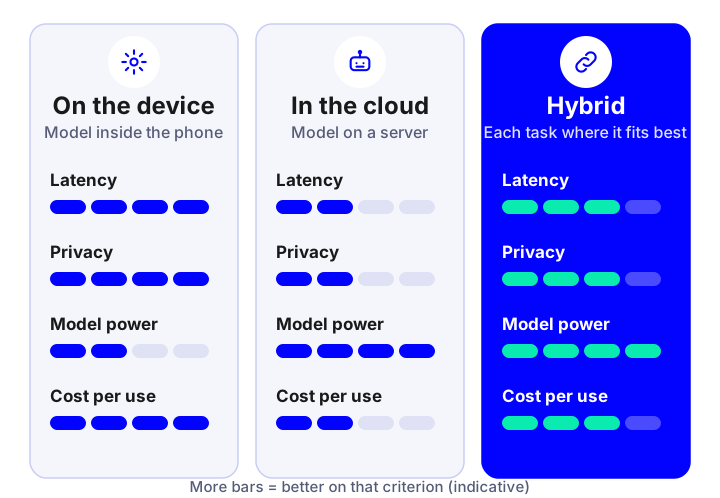
The difference in one sentence
On the device, the model travels inside the app and runs on the phone’s processor: it needs no internet and the data stays put. In the cloud, the app sends the request to a server where a much larger model runs and returns the answer. Each option solves one type of problem well, and the decision affects your app’s design, cost and privacy. For the full product picture, see mobile apps with artificial intelligence.
How to decide: criteria
| Criterion | On the device | In the cloud |
|---|---|---|
| Latency | Very low and stable; works offline | Depends on the network and the server |
| Privacy | Data may never leave the phone | Data has to be sent and agreements signed with the provider |
| Quality and power | Small models, for specific tasks | Large models, reasoning and conversation |
| Cost per use | No cost per request | Pay per use that grows with users |
| App size and battery | The model takes space and uses battery | Light on the phone, uses data |
| Updates | With the app or by downloading the model | Immediate, without touching the app |
| Compatibility | Depends on each device’s hardware | The same for everyone |
Which tasks fit where
Better on the device
Image recognition and document scanning, object detection, dictation and simple commands, filters, simple classification and functions that must work offline.
Better in the cloud
Conversational assistants, long summaries, reasoning over documents, advanced semantic search and anything that needs large models or server data.
AI integration →Hybrid
Pre-process on the phone (for example extract text from a photo) and reason in the cloud with only what is needed, reducing cost and data sent.
On iOS and Android there are system tools and open-source libraries to run models on the device (Core ML on iOS; LiteRT, formerly TensorFlow Lite, and ML Kit on Android). The specific choice depends on the case and the OS versions you want to support.
Cost, the most underestimated factor
- In the cloud you pay per use: every conversation or image processed has a cost that multiplies by your active users.
- On the device the cost is in development: optimising and maintaining models for many different phones means more up-front work.
- Reduce what you send: filter, compress and summarise on the phone before calling the cloud.
- Set limits and caching: per-user caps and reuse of answers where possible.
To estimate with numbers, use the chatbot and agent cost guide as a reference for what using language models implies.
Privacy and app store rules
- Tell users what data is used and why, and ask only for the permissions needed (camera, microphone, location).
- GDPR: if you send personal data to the cloud, you need a legal basis, minimisation and agreements with the provider.
- Apple and Google: declare the use of data and AI in their app listings; keep them up to date.
- Transparency: indicate when the user is interacting with an AI system and offer a human alternative.
How we decide it in a project
- Define the AI features and what experience they need (real time, offline, conversation).
- Classify each feature by latency, privacy, required quality and expected cost.
- Test with prototypes on real devices, including mid- and low-range ones.
- Design behaviour without a network (what can be done and what is postponed).
- Measure in production consumption, errors, cost and satisfaction, and readjust the split.
If you have a specific idea, tell us about it from custom AI app development.
Frequently asked questions
Can an app’s AI work without internet?
Yes, if the model runs on the device itself. It is common for image recognition, simple dictation or classification. Large conversational assistants usually need the cloud.
Is on-device AI more private?
Generally yes, because data may not leave the phone. Even so you must inform the user and comply with the GDPR for any personal data processed.
Which is cheaper, on-device or cloud AI?
On the device there is no cost per request but more development work; in the cloud development can be quicker but you pay per use, which grows with users. It depends on volume.
Can the two be combined?
Yes, and it is the most common approach: fast, private or offline tasks on the phone and complex reasoning in the cloud.
Does it affect battery and app size?
Yes. A local model takes space and uses battery, so it is optimised and measured on real devices, including mid-range ones.
Shall we talk about your project?
Tell us about your case and we will reply within 24-48 hours with a proposed scope and an indicative quote.
Tell us about your project
Describe what you want to achieve and which systems you work with. We reply within 24-48 hours.
Artificial intelligence services and guides
Everything we do with AI for business, from the diagnostic to the product in production. Artificial intelligence for business.
Services
- AI agents for businessSystems that plan and carry out tasks on your CRM, ERP and email.
- Custom AI chatbots24/7 support and sales on web and WhatsApp, connected to your systems.
- Assistant over your company documents (RAG)An AI that answers with your information and cites the source.
- AI integration in apps and softwareAdd language models to your product without rebuilding it.
- Artificial intelligence consultingDiagnostic, prioritised cases and a roadmap with return.
- Machine learning and predictive analyticsDemand forecasting, churn, anomalies and predictive maintenance.
- Computer vision and OCR with AIReading invoices and delivery notes and image-based quality inspection.
- Custom AI app developmentApps and platforms with AI built in from the design stage.
- Process automation with AIWorkflows that save hours of manual work.
- AI voice assistantsPhone agents that answer calls and book appointments using your systems.
- AI recommendation systemsPersonalisation and recommendations measured with A/B tests.
Guides
- AI agent, chatbot or assistant: differences
- How much an AI chatbot or agent costs
- What RAG is and how to use it in your company
- AI use cases in business by department
- How to implement AI in a small business
- n8n, Make, Zapier or custom development
- How to choose the AI model for your company
- AI, GDPR and the AI Act: what to review
- How to measure the ROI of an AI project
- How to appear in ChatGPT and AI Overviews
- What is MCP (Model Context Protocol)
- Automation with n8n for business
- 17 tools to develop apps with AI
- Mobile apps with artificial intelligence
- 10 AI automations for small businesses
- WhatsApp Business with AI: customer service
AI by sector
- AI for e-commerce
- AI for real estate
- AI for clinics and healthcare
- AI for logistics and transport
- AI for human resources
- AI for insurance and brokerage
- AI for industry and manufacturing
- AI for hospitality and restaurants
- AI for law and accounting firms
- AI for education and e-learning