
Guide · Chatbots
WhatsApp Business with AI: how to automate customer service
To automate WhatsApp with AI you need the official WhatsApp Business API, not the regular app: it lets you connect a chatbot to your systems, send approved templates and reply within the 24-hour window. A good assistant resolves questions, manages orders or appointments and hands over to a person when needed, with consent, transparency and cost control.
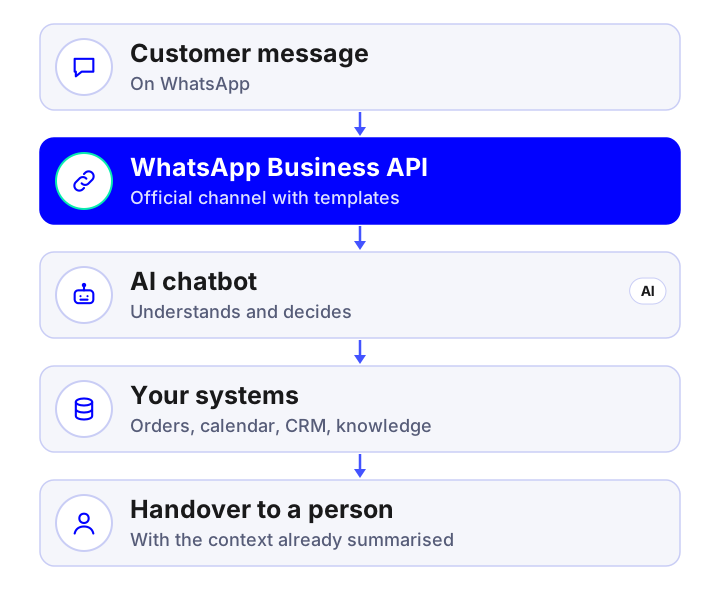
Why WhatsApp is a good channel for AI
Your customers already use WhatsApp: they reply fast, install nothing and expect an immediate answer. For a company that means many repetitive queries and, at the same time, a great opportunity: a well-built assistant replies in seconds, at any hour, with your business’s real information. It is the same kind of system as an AI chatbot for the web, but on the channel where your customers already are.
How it works technically
- Official WhatsApp Business API: contracted through Meta or an authorised provider. The standard WhatsApp Business app does not allow this kind of automation.
- Number and verification: a verified business number and a profile with your information.
- 24-hour customer service window: within 24 hours of the customer’s last message you can reply freely.
- Approved templates: to write first or outside that window you must use templates approved by Meta (order notices, appointment reminders, etc.).
- AI chatbot: a language model understands the message, checks your systems and replies, with defined rules and limits.
- Handover to a person: the team receives the chat with a summary and continues the conversation.
The platform’s conditions and fees change: always check the official WhatsApp Business documentation before quoting.
Use cases that work
Support and frequent questions
Hours, terms, prices and common queries, with your company’s information.
Orders and after-sales
Order status, changes and returns connected to the store and the carrier.
AI for e-commerce →Appointments and bookings
Book, move and cancel with the real calendar, with automatic reminders.
AI for clinics →Lead capture
Immediate reply, qualification and a CRM task with a summary for the salesperson.
Custom CRM →Notices and follow-up
Confirmations, reminders and short surveys using approved templates.
Internal support
An assistant for the team, for example in the field or warehouse, that consults procedures.
RAG assistant →Good practices so it works well
- Tell the customer they are talking to an automated assistant and always offer the option to speak to a person.
- Limit the scope: which topics it can handle and which it passes to a person (complaints, legal or health matters).
- Reply with your data, not with what the model “knows”: use your catalogue, policies and systems, with citations where relevant.
- Short, clear messages, with buttons or lists when they help.
- Review conversations every week to improve the knowledge base.
- Measure: resolution without human intervention, response time, satisfaction and conversions.
Consent, privacy and platform rules
- Consent: to send messages initiated by the company you need the person to have agreed to receive them.
- GDPR: clear information, data minimisation, limited retention and agreements with the providers that process the messages.
- Transparency about AI: tell people they are interacting with an automated system.
- WhatsApp policies: respect the commercial-use and content rules; breaching them can get the account suspended.
Informational content, not legal advice. See AI, GDPR and the AI Act.
How much it costs
| Item | Order of magnitude |
|---|---|
| Developing a WhatsApp AI chatbot with one integration | €9,000 – €30,000 |
| Chatbot with actions across several systems and channels | €20,000 – €60,000 |
| Maintenance and improvement | €300 – €1,500 / month |
| Messaging and model usage | Variable with volume; check the provider’s current rates |
These are reference prices excluding VAT. The factors that move them are in how much an AI chatbot or agent costs.
Common mistakes
- Trying to automate with the regular app’s number: it can end in the account being blocked.
- Sending mass messages without consent or approved templates.
- A bot that cannot say “I don’t know” and hand over to a person.
- Not connecting the bot to your systems and merely repeating an FAQ.
- Not measuring or reviewing conversations after launch.
Frequently asked questions
Can WhatsApp be automated with AI?
Yes, with the official WhatsApp Business API, which lets you connect an AI chatbot to your systems, send approved templates and reply within the service window.
Can I use the regular WhatsApp Business app?
The standard app offers quick replies and labels, but not advanced AI automation or integration with your systems; for that you use the official API.
How much does a WhatsApp AI chatbot cost?
A chatbot with one integration usually costs between €9,000 and €30,000, depending on channels and integrations. Messaging fees and model usage come on top.
Can I message my customers first?
Yes, but with approved templates and with the person’s consent. Outside the 24-hour window only templates can be sent.
Do I have to say it is an AI?
Yes, it is advisable and, in general, required to say that people are interacting with an automated system and to offer to speak to a person.
Shall we talk about your project?
Tell us about your case and we will reply within 24-48 hours with a proposed scope and an indicative quote.
Tell us about your project
Describe what you want to achieve and which systems you work with. We reply within 24-48 hours.
Artificial intelligence services and guides
Everything we do with AI for business, from the diagnostic to the product in production. Artificial intelligence for business.
Services
- AI agents for businessSystems that plan and carry out tasks on your CRM, ERP and email.
- Custom AI chatbots24/7 support and sales on web and WhatsApp, connected to your systems.
- Assistant over your company documents (RAG)An AI that answers with your information and cites the source.
- AI integration in apps and softwareAdd language models to your product without rebuilding it.
- Artificial intelligence consultingDiagnostic, prioritised cases and a roadmap with return.
- Machine learning and predictive analyticsDemand forecasting, churn, anomalies and predictive maintenance.
- Computer vision and OCR with AIReading invoices and delivery notes and image-based quality inspection.
- Custom AI app developmentApps and platforms with AI built in from the design stage.
- Process automation with AIWorkflows that save hours of manual work.
- AI voice assistantsPhone agents that answer calls and book appointments using your systems.
- AI recommendation systemsPersonalisation and recommendations measured with A/B tests.
Guides
- AI agent, chatbot or assistant: differences
- How much an AI chatbot or agent costs
- What RAG is and how to use it in your company
- AI use cases in business by department
- How to implement AI in a small business
- n8n, Make, Zapier or custom development
- How to choose the AI model for your company
- AI, GDPR and the AI Act: what to review
- How to measure the ROI of an AI project
- How to appear in ChatGPT and AI Overviews
- What is MCP (Model Context Protocol)
- Automation with n8n for business
- 17 tools to develop apps with AI
- Mobile apps with artificial intelligence
- 10 AI automations for small businesses
- AI in mobile apps: device or cloud
AI by sector
- AI for e-commerce
- AI for real estate
- AI for clinics and healthcare
- AI for logistics and transport
- AI for human resources
- AI for insurance and brokerage
- AI for industry and manufacturing
- AI for hospitality and restaurants
- AI for law and accounting firms
- AI for education and e-learning