
Guide · Artificial intelligence
What is RAG in artificial intelligence and how to use it in your company
RAG (Retrieval-Augmented Generation) is the technique that makes a language model answer with your own documents: before replying, the system searches for the relevant chunks and hands them to the model, which writes the answer and cites the source. It is the most common way to build an AI assistant that knows your company.
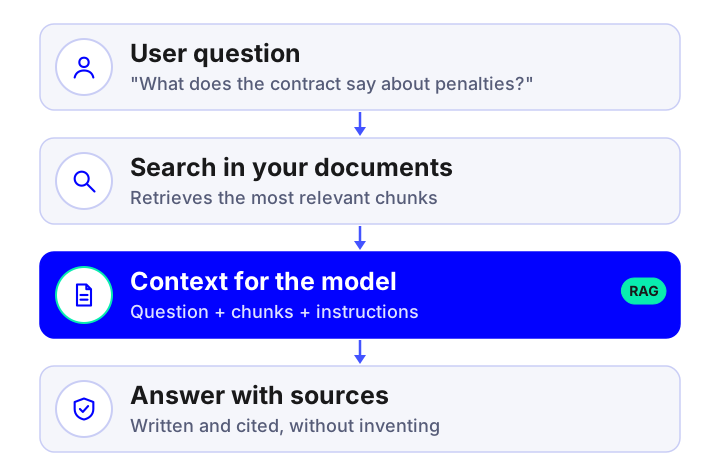
RAG explained with an analogy: the open-book exam
A language model is like a very bright student who has read half the Internet but has not seen your contracts, your procedures or your customers. If you ask about them, they improvise. RAG turns the exam into an open-book one: before answering, the system looks up the relevant pages in your documents and puts them in front of the student. The student writes the answer with them and tells you where each fact came from.
It does not require "retraining" the model. If you change a procedure, you update the document and the next answer already reflects it.
How RAG works, step by step
- Ingestion: documents are collected (PDF, Word, wikis, emails, tickets) and their text extracted, with OCR if they are scanned.
- Chunking: each document is split into meaningful chunks (sections, clauses) and metadata is added (date, area, permissions).
- Indexing: each chunk is converted into a numerical vector (embedding) that represents its meaning and stored in a vector database.
- Retrieval: given a question, the system looks for the chunks closest in meaning (and by keyword), filters by permissions and re-ranks them.
- Generation: the model receives the question, the chunks and some instructions ("answer only with this and cite the source") and writes the answer.
- Verification: sources are shown and, if there is not enough evidence, the system admits it instead of inventing.
RAG, fine-tuning or a long prompt: when to use each
| Option | What it is for | Advantages | Limitations |
|---|---|---|---|
| RAG | Answering with your company's changing knowledge | Updatable, with citations, controls permissions, moderate cost | Depends on the quality of the documents and the search |
| Fine-tuning | Adjusting style, format or a very specific task | More consistent answers on one concrete task | Expensive to update, no citations, not suited to "learning" changing documents |
| Long prompt | A few small documents that fit in the query | Very simple to set up | Does not scale, high cost per query and no permission control |
In company projects RAG is the norm, sometimes combined with fine-tuning for tone or output format.
When a RAG project makes sense
Yes, if…
You have a lot of documentation people cannot find, repeated questions to experts, procedures that change or you need answers with a source citation.
With care, if…
Documents are scanned, outdated or duplicated, or there is information with very different permissions by area.
No, if…
You have few documents that fit in a query, or what you need is exact calculations over databases (structured queries are better).
Typical mistakes when building a RAG
- Indexing documents without cleaning them: duplicate and contradictory versions produce contradictory answers.
- Chunking by fixed size and cutting a clause in half.
- Using only semantic search and failing on exact references (codes, amounts, names).
- Not filtering by permissions and showing information to people who should not see it.
- Not evaluating: without a bank of questions with expected answers you do not know whether it improves or gets worse.
- Forgetting maintenance: documents change and the index must be updated.
How to start in your company
The safest way is a proof of concept with a single data source and 30-50 real questions written by the people who will use the system. In a few weeks you will know whether the quality is sufficient and what preparation your documents need. If you want us to do it, see our AI assistant over your company documents service; if the system must also carry out actions, we take it to an AI agent, and for customer service we expose it through a chatbot. Costs are in this price guide.
Frequently asked questions
What does RAG mean in artificial intelligence?
RAG stands for Retrieval-Augmented Generation: the system retrieves relevant information from your documents and gives it to the model so it answers with it and cites the source.
What is the difference between RAG and fine-tuning?
RAG gives the model access to changing information with citations; fine-tuning adjusts the model for a style or task. For corporate knowledge, RAG is usually cheaper, easier to update and easier to audit.
Is the AI trained on my documents?
Not in a RAG system: documents are indexed in your environment and queried on every question. They are not used to train public models if the contract with each provider is set up correctly.
What is a vector database?
It is a database that stores numerical vectors representing the meaning of each chunk of text and lets you search by similarity of meaning, not just by exact words.
Does RAG eliminate hallucinations?
It greatly reduces them by anchoring answers to documents, but it does not eliminate them. That is why citations, scope limits, evaluation and the option of saying "I don't know" are added.
Shall we talk about your project?
Tell us about your case and we will reply within 24-48 hours with a proposed scope and an indicative quote.
Tell us about your project
Describe what you want to achieve and which systems you work with. We reply within 24-48 hours.
Artificial intelligence services and guides
Everything we do with AI for business, from the diagnostic to the product in production. Artificial intelligence for business.
Services
- AI agents for businessSystems that plan and carry out tasks on your CRM, ERP and email.
- Custom AI chatbots24/7 support and sales on web and WhatsApp, connected to your systems.
- Assistant over your company documents (RAG)An AI that answers with your information and cites the source.
- AI integration in apps and softwareAdd language models to your product without rebuilding it.
- Artificial intelligence consultingDiagnostic, prioritised cases and a roadmap with return.
- Machine learning and predictive analyticsDemand forecasting, churn, anomalies and predictive maintenance.
- Computer vision and OCR with AIReading invoices and delivery notes and image-based quality inspection.
- Custom AI app developmentApps and platforms with AI built in from the design stage.
- Process automation with AIWorkflows that save hours of manual work.
- AI voice assistantsPhone agents that answer calls and book appointments using your systems.
- AI recommendation systemsPersonalisation and recommendations measured with A/B tests.
Guides
- AI agent, chatbot or assistant: differences
- How much an AI chatbot or agent costs
- AI use cases in business by department
- How to implement AI in a small business
- n8n, Make, Zapier or custom development
- How to choose the AI model for your company
- AI, GDPR and the AI Act: what to review
- How to measure the ROI of an AI project
- How to appear in ChatGPT and AI Overviews
- What is MCP (Model Context Protocol)
- Automation with n8n for business
- 17 tools to develop apps with AI
- Mobile apps with artificial intelligence
- 10 AI automations for small businesses
- WhatsApp Business with AI: customer service
- AI in mobile apps: device or cloud
AI by sector
- AI for e-commerce
- AI for real estate
- AI for clinics and healthcare
- AI for logistics and transport
- AI for human resources
- AI for insurance and brokerage
- AI for industry and manufacturing
- AI for hospitality and restaurants
- AI for law and accounting firms
- AI for education and e-learning