
Developing an app for a company that operates in Sweden, Norway, Finland, or Denmark requires defining what its users need, which systems it must connect to, and how it will be maintained after launch. These decisions make it possible to choose a technology partner and compare proposals on a level playing field.
Whether you need a customer app, a mobile tool for employees, or a new digital product, it’s a good idea to specify the essential features, the platforms—iOS and Android—and the languages for the first version. It’s also important to agree on what the service will include: design, development, backend, testing, release, and support.
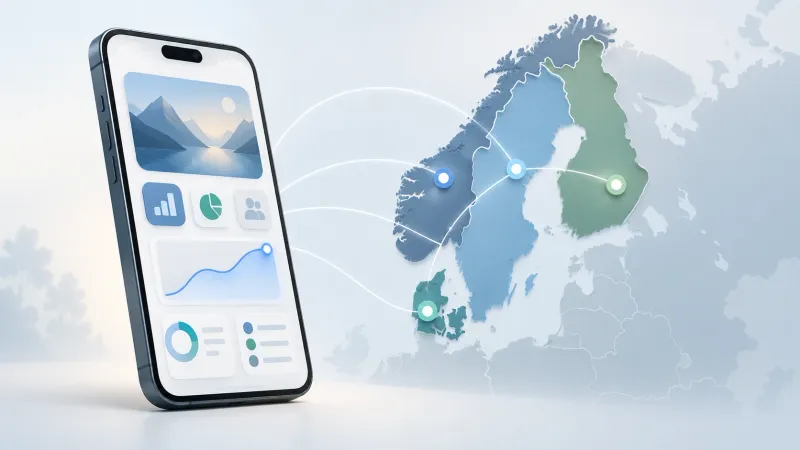
In this guide, we explain what to consider before hiring a mobile app development company in the Nordic countries, how to evaluate technologies, and what questions to ask vendors. We also present North Tech Labs’ approach to these markets and discuss when it makes sense to complement an app with custom software, artificial intelligence, or automation.
Table of Contents
What to Decide Before Hiring Someone to Develop an App
Before requesting quotes, prepare a brief document describing the problem you want to solve and what you expect from the application. You don't need to have all the screens designed yet: the goal is for vendors to understand the project and be able to identify requirements, dependencies, and pending decisions.
Sharing this same document with the companies you are evaluating will make it easier to compare their proposals.
Users, Target Audience, and Essential Features
Identify who will use the app and what tasks they need to be able to complete. If there are multiple user profiles—customers, employees, administrators, or collaborators—explain what each one needs and what information they will have access to.
Also define the outcome you're looking for. For example, an app can allow users to book a service, schedule maintenance, or check the status of orders without contacting customer service.
For each essential function, describe:
- What action does the user take?.
- What information do you need?.
- What result should you get?.
- What happens if there's an error or you can't complete the task?.
In an app for field technicians, for example, the main workflow might involve viewing a task, documenting the work with photos, and submitting it for review. Determining whether the app needs to work offline will influence development decisions.
Platforms, Languages, and Launch Markets
Decide whether the first version needs to be available for iOS, Android, or both platforms. Use the information you have about your users' devices and ask the provider to explain the implications of each option.
If the app is intended for Sweden, Norway, Finland, or Denmark, specify in which countries it will be launched and which languages the target audience needs. The language used to communicate with the development team may differ from the app's language.
It also covers device requirements, accessibility, and distribution. A public app for customers and an internal tool may require different release processes.
Even if you start with just one market, let us know if you plan to expand to others. That way, we can take into account translation management and any necessary configuration changes right from the design phase.
Integrations and the First Version of the Product
List the systems the application needs to connect to: CRM, ERP, payments, reservations, inventory, maps, or other business tools.
For each integration, specify what data needs to be exchanged, who controls the system, and whether technical documentation is available. If you don't know yet, leave it as an item to be verified before finalizing the scope.
Next, separate the essential features from the improvements that can wait. The first version should allow users to complete the main journey and evaluate its usefulness with real users.
For example, a booking app could start with availability checks, confirmations, and notifications. A loyalty program or an AI-powered assistant could be added later, if their usefulness justifies the development effort.
The result of this preparation should be a document outlining users, objectives, priority features, platforms, languages, and integrations. This will serve as the basis for requesting a development proposal with a clear scope.
What a Mobile App Development Proposal Should Include
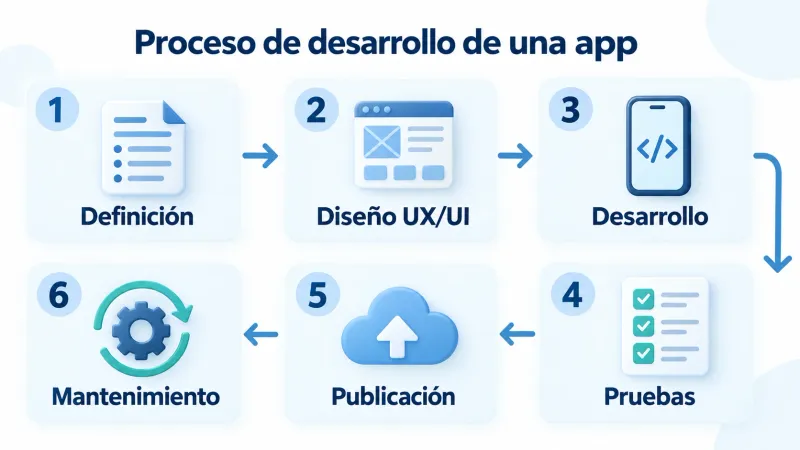
A development proposal should explain what you will receive, who will be responsible for each phase, and how deliverables will be verified. The budget should clearly outline the work included, as well as dependencies and potential additional costs.
To compare app development companies, make sure their proposals address the same needs. A proposal limited to mobile programming will have a different scope than one that includes design, backend development, testing, and launch.
Product Definition and UX/UI Design
The initial phase should translate the requirements into a scope that both parties can review. Depending on the project, deliverables may include user flows, priority features, acceptance criteria, and a technical proposal.
UX/UI design allows us to assess how different user profiles will use the application. Please specify in your proposal whether it includes:
- Navigation Structure and Screens.
- Visual interface design.
- Prototype for reviewing the main routes.
- Load statuses, errors, and missing data.
- Adaptation to the agreed-upon languages and accessibility requirements.
It also specifies how many rounds of review are planned and how the design will be approved. This helps identify changes before coding begins and distinguish between planned adjustments and new features.
Mobile development, backend, and admin panel
The proposal must specify what will be developed for iOS and Android, what technology will be used, and why it is a good fit for the project.
In addition to the screens, it is important to specify the components needed to run the application: user accounts, permissions, data storage, notifications, and integrations with external services.
If you need an admin panel, specify what tasks it will allow users to perform. For example, managing reservations, editing content, handling requests, or viewing activity. Its scope should be defined along with that of the app.
Also check the responsibilities related to existing systems. If another provider needs to provide access to an API or prepare data, that dependency must be included in the planning.
Our services include mobile application development You can learn about the phases and components involved in creating a business app.
Testing, Publication, and Maintenance
Before the launch, agree on which tests will be performed and what criteria will determine whether the product is acceptable. The scope should correspond to its features: main workflows, permissions, integrations, devices, and error scenarios.
If the app needs to work offline, send notifications, or process payments, those features require specific testing.
For the release, specify who will be responsible for preparing the versions, setting up the accounts, and providing the materials requested by the App Store and Google Play. Also include how any comments raised during the stores' review process will be addressed.
Finally, it distinguishes between the conditions following the launch:
- Correction of errors: What incidents it covers and for what period.
- Technical maintenance: updates and tasks necessary to maintain compatibility and stability.
- Support: customer service channels, coverage, and agreed-upon response times.
- Development: Procedure for estimating costs and implementing new features.
The proposal should also include the handover of the code, documentation, and agreed-upon access rights. With these elements, you will be able to assess the initial cost and the conditions for maintaining and expanding the application.
React Native, Flutter, or Native Development: How to Choose
The technology for a mobile app should be chosen based on its features, the users' devices, and maintenance requirements. Before making a decision, ask the provider to explain the solution they are proposing, the benefits it offers to the project, and any limitations that will need to be addressed.
React Native and Flutter allow you to share code between iOS and Android versions. Native development uses each platform's native tools, typically Swift for iOS and Kotlin for Android.
| Technology | How It Works | What to Evaluate |
|---|---|---|
| React Native | Share code between iOS and Android and use native UI components | Integration compatibility, team experience, and the specific needs of each platform |
| Flutter | Share code and use your own system to build the interface | Design specifications, compatibility of necessary components, and maintenance |
| Native development | Develop each version using iOS and Android's native tools | Integration with system functions, performance requirements, and resources needed to maintain both versions |
When to Evaluate a Cross-Platform Application
React Native and Flutter can be a good fit when the iOS and Android versions share features and offer a similar user experience. For example, in booking apps, customer portals, or management tools.
Sharing code can reduce duplicate work, but the savings will depend on the project. It will still be necessary to test each platform and address differences in permissions, notifications, navigation, and integrations.
Verify that the system can support both the shared code and the specific components required by the application.
When to Evaluate Native Development
Native development may be appropriate when the product relies on specific iOS or Android features, requires deep integration with the device, or has performance requirements that must be carefully evaluated.
These requirements do not automatically rule out a cross-platform solution. It is advisable to compare the alternatives and, if there is any uncertainty, conduct a technical test of the most demanding feature before committing to the full development.
What the supplier must provide as proof
A useful technical proposal should explain how your app's requirements will be met. Ask for specific answers to these questions:
- Are the integrations and features of the device we need compatible?
- Which features can be shared between iOS and Android?
- Will there be any components that require specific development?
- How will performance be tested on the target devices?
- What external dependencies will the application use?
- How will updates and maintenance be handled?
The final decision should take into account cost, technical capabilities, and product evolution. Choose a technology that the team can justify and maintain throughout the application's lifecycle.
How to Prepare an App for the Nordic Markets
If your app will be used in Sweden, Norway, Finland, or Denmark, determine which elements will be common and which will need to be adapted. This planning allows you to address the different markets without having to develop four separate products.
The scope will depend on the users, the countries where the app will be launched, and the services it offers. It’s a good idea to identify these needs before finalizing the design and budget.
Translation and Adaptation of the User Interface
Choose the languages based on the target audience. Just because the project is managed in English doesn't mean that's the right language for all users of the app.
Include screen text, forms, notifications, error messages, and help content in the scope. Define who will prepare the translations and who will review them within the app.
The review should check both the meaning and the presentation:
- Buttons and menus with enough space for text of varying lengths.
- Clear instructions for filling out forms.
- Consistent terminology across all screens.
- Messages explaining how to resolve an error.
- Emails and notifications in the appropriate language.
Separating text from code makes it easier to correct translations and add new languages. It's also a good idea to decide what the user will see when content isn't yet available in their language.
Formats and Integrations by Market
Review how dates, times, numbers, amounts, phone numbers, and addresses will be displayed. If the app operates in multiple countries, define how those settings will be selected and when users will be able to change them.
For applications involving reservations or scheduled tasks, it specifies how time zones will be handled. For products that involve payments, it distinguishes between the displayed currency, the currency charged, and the information required by the billing system.
Integrations must also be tested based on their intended use. For each payment, identification, mapping, messaging, or business management service, verify the following:
- Availability for users and launch countries.
- Compatibility with the necessary features.
- Access to documentation and test environments.
- Costs, usage limits, and dependencies.
- How the app behaves if the service fails.
These checks help identify requirements that may affect the scope. They also document which configurations will be common and which will vary by market.
User Validation Before Launch
Test the app with members of the target audience before expanding its distribution. The validation should verify whether they understand the interface and can complete the main tasks.
For a booking app, for example, you can see if the user finds availability, understands the price, confirms the transaction, and knows how to modify it. For an employee tool, test the user flow under real-world working conditions.
Prepare specific tasks and track where users encounter questions, make mistakes, or abandon the process. Include the language versions and devices you want to test.
If you start with just one country, use what you've learned to improve the product, but also review how it has been adapted for subsequent markets. A phased rollout allows you to resolve issues before bringing in more users.
The result of this preparation should be a clear overview of the languages, formats, integrations, and tests included in the first version, along with the planned adaptations for future phases.
How to Compare App Development Companies
To compare vendors, share the same requirements document and ask them to specify what their proposal includes, what it excludes, and what issues they need to review. This will allow you to identify differences in scope before evaluating the price.
This comparison should help you choose a team capable of building your application and supporting it as it evolves. Here are the aspects you should compare.
Demonstrable experience in similar projects
Ask for examples related to the challenges your app faces: reservations, payments, geolocation, offline functionality, user management, or integration with business systems.
Ask what the vendor's role was in each project. Designing the interface, developing part of the application, and managing the entire product are different tasks.
To evaluate the examples, check the following:
- What problem did the app solve?.
- What features did the team develop?.
- What technical challenges did you encounter, and how did you address them?.
- If you'd like to check out the product or see a demonstration.
- What kind of support did they provide after the launch?.
Distinguish between completed projects and conceptual examples. If there are confidentiality restrictions, the vendor may explain its work without disclosing client information.
You can also ask for references from clients with similar needs. The most helpful references describe how the team worked, how it handled changes, and what happened when problems arose.
Scope, Budget, and Monitoring
Review the proposals by deliverable: definition, design, mobile development, backend, integrations, testing, and deployment. Verify that all of them include the project’s essential features.
It asks that the assumptions underlying the budget be identified. For example, an estimate may depend on an API being available, the client providing the content, or there being no need to migrate data.
It also clarifies:
- What type of contract is being proposed?.
- How changes to the scope will be approved.
- What milestones will determine the payments?.
- Which dependencies can affect the schedule?.
- Who will answer questions and make decisions?.
- How you can review and accept each delivery.
Regular demonstrations and access to a testing environment allow you to monitor progress. Agree on a review schedule that makes it easier to identify discrepancies and make timely decisions.
Also consider the recurring costs of infrastructure, external services, and maintenance. An initial proposal that appears more economical may involve less work or shift costs to later phases.
Code Ownership, Access, and Support
Before signing a contract, agree in writing on the ownership of the developed code and the terms of use for external components. Request that any licenses or dependencies that may affect the product’s operation and development be identified.
Define what access your company will receive and when it will be granted. Depending on the project, this may include repositories, infrastructure, databases, publishing accounts, and third-party services.
The documentation should explain how the application is configured, deployed, and maintained. It is also important to specify how credentials will be managed and who will have permission to make changes.
Finally, compare the support terms:
- Coverage and Service Channels.
- Incident Classification.
- Agreed-upon response times.
- Updates included.
- Procedure for Requesting Improvements.
- Conditions for transferring maintenance to another team.
Compile the responses in a table using the same criteria for all vendors. This comparison will help you make a decision based on relevant experience, scope, and terms of collaboration.
Block 7 — Local Vendor or Remote Partner: What Your Project Needs
Place it after the section on comparing companies. This section has an H2 heading.
Local Vendor or Remote Partner: What Your Project Needs
When hiring app development services for a company in Sweden, Norway, Finland, or Denmark, evaluate the provider’s location based on your collaboration needs. A physical presence may be important when the project requires observing processes on-site, testing devices in the field, or holding frequent in-person meetings.
If those activities are one-time events, you can arrange them separately and carry out the rest of the development remotely. Remote collaboration requires designated team leaders, overlapping schedules, and a process that allows for reviewing the product as it is being built.
| Need for the Project | What Should Be Agreed Upon |
|---|---|
| Observation of Work at Facilities | Who will conduct the visits and how will they document the requirements? |
| Testing with physical equipment or devices | Access to Materials, Responsible Parties, and Test Conditions |
| Frequent Meetings and Decisions | Language, schedules, and individuals with approval authority |
| User validation in each market | Participants, tasks, and the person responsible for compiling the results |
| Incident Support | Coverage, Channels, and Escalation Procedure |
In a remote team, the working language should allow both parties to understand requirements, decisions, and deliverables. If meetings are held in English, confirm who will participate on behalf of your company and how agreements will be documented.
Also designate a person within your organization who will be responsible for the product. This person’s role will be to address business questions, coordinate reviews, and approve priorities. The vendor, in turn, must identify who is leading the development and who will be in charge of follow-up with you.
Before signing a contract, ask them to explain how you’ll track progress. It’s a good idea to have regular demonstrations, a testing environment, and an accessible log of tasks and decisions. Agree on what your team needs to review each deliverable and how much time they’ll have to do so.
Finally, distinguish between serving a market and having a physical presence in it. Confirm where the team works, which entity you’ll hire, and what availability it offers. That information will allow you to evaluate the proposal based on the collaboration model your project requires.
North Tech Labs: App Development for Nordic Companies
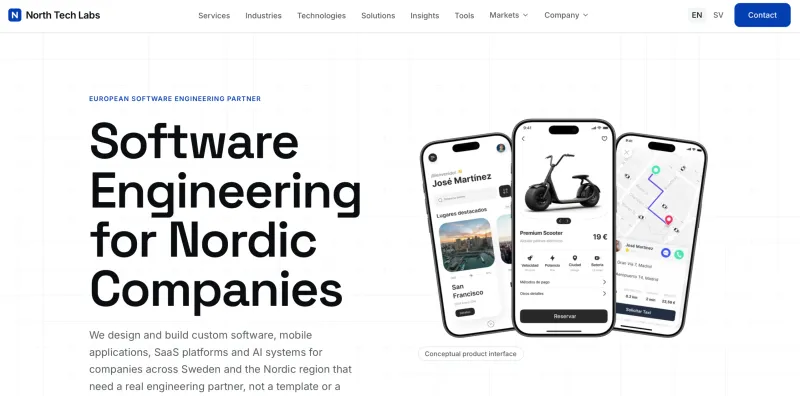
North Tech Labs It offers mobile app development for companies in Sweden, Norway, Finland, and Denmark. Its offerings also include custom software, SaaS platforms, and artificial intelligence systems.
The brand operates remotely from Europe, with project communication conducted in English. According to information published on its website, it serves these markets without local offices in any of the four countries.
If you're considering their app development services, share your product requirements and request a proposal that specifies:
- Features included in the first version.
- Recommended platforms and technology.
- The backend, the admin panel, and the necessary integrations.
- The design, development, testing, and release phases.
- Responsibilities, deliverables, and maintenance requirements.
Compare the proposal with the criteria listed above and ask for examples relevant to your project. This will allow you to assess whether their experience and collaboration model align with your company's needs.
Software, AI, and automation tools that complement an app
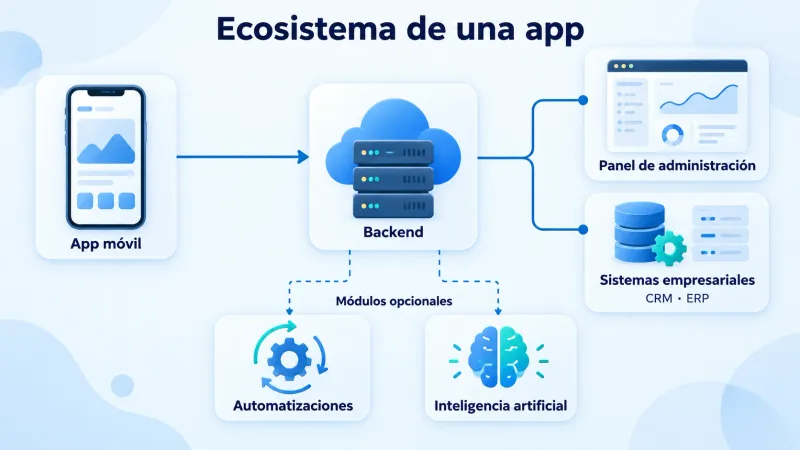
A mobile app may require other components to provide the full service: management tools, connections to enterprise systems, or processes that run in the background.
Define these components based on the user journey and the needs of the team that will operate the application. This will help you determine what is essential for launch and what can be added later.
Custom Software and Integration with Business Systems
The backend manages the app's logic and data. In some projects, additional software is also needed to coordinate operations, manage services, or connect departments.
For example, an application for requesting repairs may require an internal tool that assigns jobs, tracks materials, and allows users to check their status. If the company already has a system that performs these tasks, it’s a good idea to explore integrating it before building another one.
To define the scope, identify where each piece of data is stored, which system can modify it, and how the information will be updated across tools. You must also agree on what will happen if a connection fails or data is received incompletely.
You can check out our services at custom software development to learn how we approach tools and integrations tailored to a company's processes.
Process Automation
Automations allow you to run tasks when certain conditions are met. They can be used to send notifications, update statuses, synchronize data, or generate tasks based on an action performed in the app.
In a booking app, for example, a confirmation can trigger a reminder and update availability. In a fieldwork tool, marking a task as complete can initiate a review by a supervisor.
Before automating, define:
- Which event triggers the process?.
- What conditions must be met?.
- What actions can the system perform?.
- How duplicate actions will be prevented.
- Who will be notified if the process fails?.
When conditions are clearly defined, rule-based automation can address the need without incorporating artificial intelligence.
Artificial Intelligence for Specific Functions
AI can complement an app in tasks such as extracting information from documents, searching a knowledge base, or preparing a draft for a person to review later.
Each function must have an objective and evaluation criteria. For a data extraction, for example, it is advisable to check which fields are retrieved correctly, what errors occur, and when a review should be requested.
Before implementing it, specify what information it will be able to use, what permissions it will have, and which actions will require approval. Also include the cost of use and the expected behavior when the result is invalid or the service is unavailable.
In our artificial intelligence development services You can explore potential applications for business processes.
Prioritize features that improve a specific task within the application. Integrations, automations, and AI capabilities should have a defined scope and a way to verify their usefulness.
How Much Does It Cost to Develop an App, and What Factors Affect the Timeline?
The budget and timeline depend on the features, integrations, and work required to launch the app. Targeting Sweden, Norway, Finland, or Denmark may require additional customization, but the launch country alone is not sufficient to calculate the cost.
To get a useful estimate, define the app's main user flows and ask that the proposal identify their deliverables, assumptions, and dependencies.
Factors That Determine the Budget
Two apps with a similar number of screens may require very different levels of effort. A screen that displays information is different in complexity from one that processes payments, synchronizes data, or works offline.
| Factor | What the proposal should specify |
|---|---|
| Functionalities | Workflows, business rules, and error scenarios |
| Platforms | iOS and Android versions and specific requirements |
| Design and Languages | Proofreading, Review, and Content Adaptation |
| Backend and Administration | Data, Permissions, and Management Tools |
| Integrations | External systems, documentation, and testing |
| Data Migration | Source, Quality, and Preparation of Information |
| AI and Automation | Scope, Assessment, and Necessary Services |
| Launch | Testing, Publication, and Deployment |
Request a breakdown by phase and verify what each part contributes: content, translations, access, data, and validations. Any pending items should be listed as a hypothesis or a task to be resolved.
What Can Affect the Schedule
The timeline includes definition, design, development, testing, and preparation for launch. Some tasks can be performed in parallel; others require a prior decision or deliverable.
The most common dependencies include access to external systems, design approval, content availability, and client review of functionality.
To evaluate the plan, ask:
- Which episodes will you be able to watch, and when?
- What decisions does your company need to make at each stage?
- What dependencies can slow down the work?
- How will scope changes be managed?
- How much time is allotted for resolving issues and preparing the publication?
In projects involving technical uncertainty, an initial analysis phase or an integration test can help produce a more well-founded estimate.
Initial Investment and Recurring Costs
Distinguish between the cost of building the app and the cost of keeping it up and running. After launch, there may be expenses related to infrastructure, third-party services, support, and updates.
If the application uses maps, messaging, document processing, or AI models, please explain how its resource consumption is calculated and what usage scenarios have been considered.
It also calls for separating technical maintenance from new features. This will make it easier to plan the product's evolution and compare the terms offered by different vendors.
To request a quote, provide the same scope of work to all the companies you're evaluating. A useful proposal should clearly explain what you'll receive, what factors might affect the price, and what expenses you'll incur after launch.
Frequently Asked Questions About App Development for the Nordic Countries
Do I need a vendor with an office in the country where the product is being launched?
It depends on the project's activities. If you need frequent visits, on-site testing, or in-person work, location may be important. For remote collaboration, check the working language, availability schedules, who is in charge, and how you will review deliverables.
Can I launch in one country first and then expand?
Yes. You can start in Sweden, Norway, Finland, or Denmark and expand distribution after the app has been validated. Specify the target markets from the outset so that translations, formats, and integrations can be planned accordingly. Before each launch, review the relevant adaptations with users in the target market.
Should I develop for iOS and Android from the start?
The decision depends on the devices your audience uses and the reach of the first version. If you need both platforms, ask the provider to compare a cross-platform solution with native development. If you start with just one, agree on what it will entail to add the second one later.
What information do I need to request a quote?
Prepare a description of the objective, the users, and the essential features. Include platforms, languages, launch countries, integrations, and schedule constraints. Also specify what you need the provider to include: design, backend, admin panel, testing, deployment, and maintenance.
Can AI and automation be added later?
Yes, although the work will depend on the architecture, the available data, and the systems that need to be connected. Define each feature based on the task it will solve and how you will verify its usefulness. If you’re already anticipating these improvements, discuss them during the planning phase to identify any potential dependencies.
How to Start Your Mobile App Project
To get started, prepare a project summary that outlines the problem you want to solve, who will use the app, and what features the first version needs. Include the platforms, languages, launch countries, and systems it will need to connect to.
If there are still pending decisions, please list them. This summary will allow the vendor to identify what it needs to review before proposing a scope, technology, and estimate.
If your company operates in Sweden, Norway, Finland, or Denmark and you're looking for a mobile app development partner, you can Submit your project to North Tech Labs. Share your requirements and request a proposal that details the phases, deliverables, and terms of collaboration.